





Dog Coloring Book for Adults
1. Game Background & Introduction
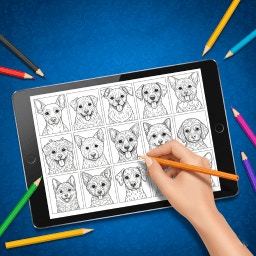
Adult coloring has moved from paper‑backed hobby books to interactive digital experiences, and Dog Coloring Book for Adults is a standout example. The game blends the soothing act of coloring with a love for dogs, offering a library of intricate canine silhouettes, breed‑specific sketches, and mandala‑style patterns that interlace fur, paws, and decorative motifs.
Why It Matters
- Mindfulness & Relaxation – Repetitive, focused strokes help quiet the mental chatter, encouraging a meditative state.
- Stress & Anxiety Relief – The act of choosing colors and filling shapes triggers the brain’s reward pathways, lowering cortisol levels.
- Cognitive Stimulation – Planning color schemes, managing layers, and noticing fine details sharpen attention and visual‑spatial skills.
The game is built for anyone who wants a peaceful escape without the need for artistic training. All tools are digital, meaning you can experiment freely, undo mistakes, and produce vibrant results that can be saved or shared instantly.
2. Gameplay Mechanics
2.1 Getting Started
- Launch the app and create a simple profile (optional).
- Browse the gallery – categories include “Purebred Portraits,” “Playful Pups,” “Mandala Mutts,” and “Seasonal Specials.”
- Select a page – each illustration is divided into numbered or outlined sections that guide your coloring flow.
2.2 Core Tools
Brush
- Description: Soft‑edged, variable size, pressure‑sensitive (if supported)
- Best Use: Large areas, smooth gradients
Pencil
- Description: Fine line, textured stroke
- Best Use: Detailing, fur highlights
Marker
- Description: Opaque, solid fill
- Best Use: Bold color blocks, high‑contrast sections
Airbrush
- Description: Light, misty overlay
- Best Use: Soft shading, background washes
Eraser
- Description: Precise removal, can revert to original line art
- Best Use: Fixing errors, refining edges
Fill Bucket
- Description: Instant color fill within closed boundaries
- Best Use: Quick base layers
All tools support opacity control, layering, and undo/redo functions, allowing you to experiment without fear of permanent mistakes.
2.3 Color Palette & Customization
- Preset Palettes – “Pastel Calm,” “Vibrant Pop,” “Earthy Tones,” and “Neon Fun.”
- Custom Mix – Use the color wheel to create unique shades; the app stores up to 20 custom colors per session.
- Texture Overlays – Add subtle grain, watercolor bleed, or metallic shimmer to any filled area.
2.4 Saving, Exporting & Sharing
- Auto‑save after each stroke, ensuring no work is lost.
- Export Options – PNG (high‑resolution), JPEG (compressed), or PDF (print‑ready).
- Social Integration – Direct sharing to Instagram, Facebook, or a private community gallery within the app.
3. Strategies & Tips for Mastery
3.1 Choosing the Right Illustration
- Start Simple – Begin with “Puppy Play” or “Basic Breed Silhouettes” that have larger, fewer sections.
- Progress Gradually – Move to “Mandala Mutts” once you’re comfortable with layering and color harmony.
- Match Mood to Design – Use calming palettes for intricate mandalas; bold palettes work well with playful, cartoon‑style pups.
3.2 Building a Cohesive Color Scheme
- Pick a Dominant Hue – Choose one color that will dominate 40‑50 % of the page (e.g., a warm amber for a golden retriever).
- Select Complementary Accents – Use the color wheel to find 2‑3 complementary shades for secondary elements (e.g., teal for the background).
- Add Neutrals – Whites, grays, or soft browns help balance bright colors and prevent visual overload.
3.3 Layering Techniques
- Base Layer – Fill large sections with a flat color using the Fill Bucket.
- Mid‑Tone Layer – Apply a slightly darker or lighter shade with the Brush, using gentle strokes to create depth.
- Highlight Layer – Use the Pencil or Airbrush for fine fur highlights, especially on the nose, ears, and eyes.
3.4 Shading & Depth
- Direction of Light – Decide where the light source is (top‑left is common). Shade opposite sides with a darker tone, leaving the light‑facing side brighter.
- Gradual Opacity – Reduce brush opacity to 30‑40 % for subtle transitions; build up intensity gradually.
- Texture Brushes – Switch to a “fur” brush for realistic pet fur; apply short, overlapping strokes following the animal’s natural hair flow.
3.5 Mindful Coloring Practices
- Set a Timer – 15‑20 minutes of uninterrupted coloring can act as a mini‑meditation.
- Focus on Breath – Inhale while selecting a color, exhale while applying it. This synchronizes the creative act with relaxation.
- Embrace Imperfection – If a section looks “off,” use the Eraser or a new layer to experiment. The digital format makes trial and error painless.
3.6 Advanced Tips
- Create a Personal Palette – Save a set of colors you love and reuse them across multiple pages for a signature style.
- Use Layers for Complex Designs – Separate background, main dog, and decorative elements onto different layers; you can edit each independently.
- Export for Print – If you enjoy physical art, export at 300 dpi and print on high‑quality matte paper for a gallery‑ready piece.
4. Special Features
4.1 Interactive Tutorials
The game includes short, step‑by‑step video guides that demonstrate:
- How to blend colors using the Brush and Airbrush.
- Techniques for realistic fur rendering.
- Ways to create mandala symmetry with the “Mirror” tool.
4.2 Daily Challenges
Every day a new “Theme of the Day” appears (e.g., “Sunset Poodles” or “Winter Huskies”). Completing the challenge unlocks a badge and a limited‑edition color palette.
4.3 Community Gallery
- Like & Comment – Interact with other players’ creations, exchange color ideas, and receive constructive feedback.
- Curated Collections – The developers feature standout works in a rotating “Artist Spotlight,” giving exposure to talented colorists.
4.4 Accessibility Options
- Color‑Blind Mode – Adjusts palette contrast and adds pattern overlays to differentiate sections.
- Zoom & Pan – Pinch‑to‑zoom for detailed work, with a smooth pan that keeps the line art crisp.
4.5 Relaxation Mode
A dedicated mode removes all UI distractions: only the canvas, a minimal toolbar, and soft ambient music. This mode is ideal for deep mindfulness sessions.
5. Putting It All Together – Your First Masterpiece
- Open Relaxation Mode and select the “Mandala Mutts – Labrador” page.
- Choose a Calm Palette – pastel blues, soft grays, and a muted amber for the dog’s coat.
- Lay Down the Base – fill the large mandala background with a light teal using the Fill Bucket.
- Add Depth – brush a slightly darker teal on the outer rings, blending outward with low opacity.
- Color the Labrador – start with a base amber, then layer a deeper brown on the shadows (under the ears, belly).
- Highlight Fur – switch to the “Fur” brush, using short strokes of a lighter amber on the top of the head and tail.
- Final Touches – add a subtle white sparkle to the eyes with the Pencil, and a faint gold shimmer to the mandala’s center using the metallic texture overlay.
- Save & Share – export as PNG, post to the community gallery, and note the badge earned for completing the “Calm Canine” challenge.
6. Closing Thoughts
Dog Coloring Book for Adults is more than a pastime; it’s a portable studio that blends artistic expression with therapeutic benefits. By mastering the tools, developing a thoughtful color strategy, and embracing the game’s mindfulness‑focused features, you’ll turn each page into a personal sanctuary.
Take the time to explore the palettes, experiment with layers, and most importantly, let the rhythmic motion of coloring guide you into a calmer, more focused state of mind. Happy coloring!